Quoting and order operations for 3D printing

From CAD upload
to an approved, trackable order.

Oqta3D analyzes geometry, checks manufacturability and applies your pricing logic. Customers get a clear buying experience; your team keeps control of commercial risk and fulfillment.

STL · STEP · IGES · OBJ · 3MF · PLY · GLB · DAE
Geometry analysis, DFM feedback and configurable pricing in one flow

Drop a 3D file to start
Select a process
In production
Delivered
Order workflow completed
Quote approved Production completed Delivery recorded
Try it live
5
Process familiesFDM · SLA · SLS · MJF · Cast urethane & silicone
8+
File formatsSTL · STEP · IGES · OBJ · 3MF · PLY · GLB · DAE & More
4
Work rolesadmin · sales · production · viewer
1
Connected workflowrequest · quote · approval · order · delivery
The customer experience gap

Why qualified customers leave before asking for a quote

They may trust your production quality and still choose another supplier. The difference is often not the part or the price; it is how quickly they can move from a CAD file to a confident decision.

When pricing starts in the inbox

Manual journey
  1. Find a contact addressThe buying journey leaves your website.
  2. Explain the part by emailCAD files, quantities and expectations arrive unstructured.
  3. Wait for engineering and pricingThe customer has no price, lead time or visible progress.
  4. Compare whoever replied firstResponse speed becomes part of the purchasing decision.
The opportunity becomes an email thread you cannot see or measure.
When Oqta3D is on your site

Connected journey
  1. Upload the CAD fileThe request begins inside your own customer journey.
  2. See DFM, price and lead timeYour geometry and pricing rules run in one flow.
  3. Approve the commercial offerStandard work moves forward; exceptions remain under team control.
  4. Track the orderThe customer follows production and shipment without another thread.
A faster customer experience without giving up pricing or margin control.

From upload to order in three steps

No forms to fill before the price is known. Drop a file and see the number.

01

Upload a CAD file

Your customer drags in a STEP, STL, IGES, OBJ, 3MF, PLY or GLB. STEP and IGES give the most accurate results.

02

Get DFM and a price

Wall thickness, overhang, watertight and build-fit are checked automatically, with a live price and lead time.

03

Order and track

Approve the quote and follow production from submission to delivery, with status updates along the way.

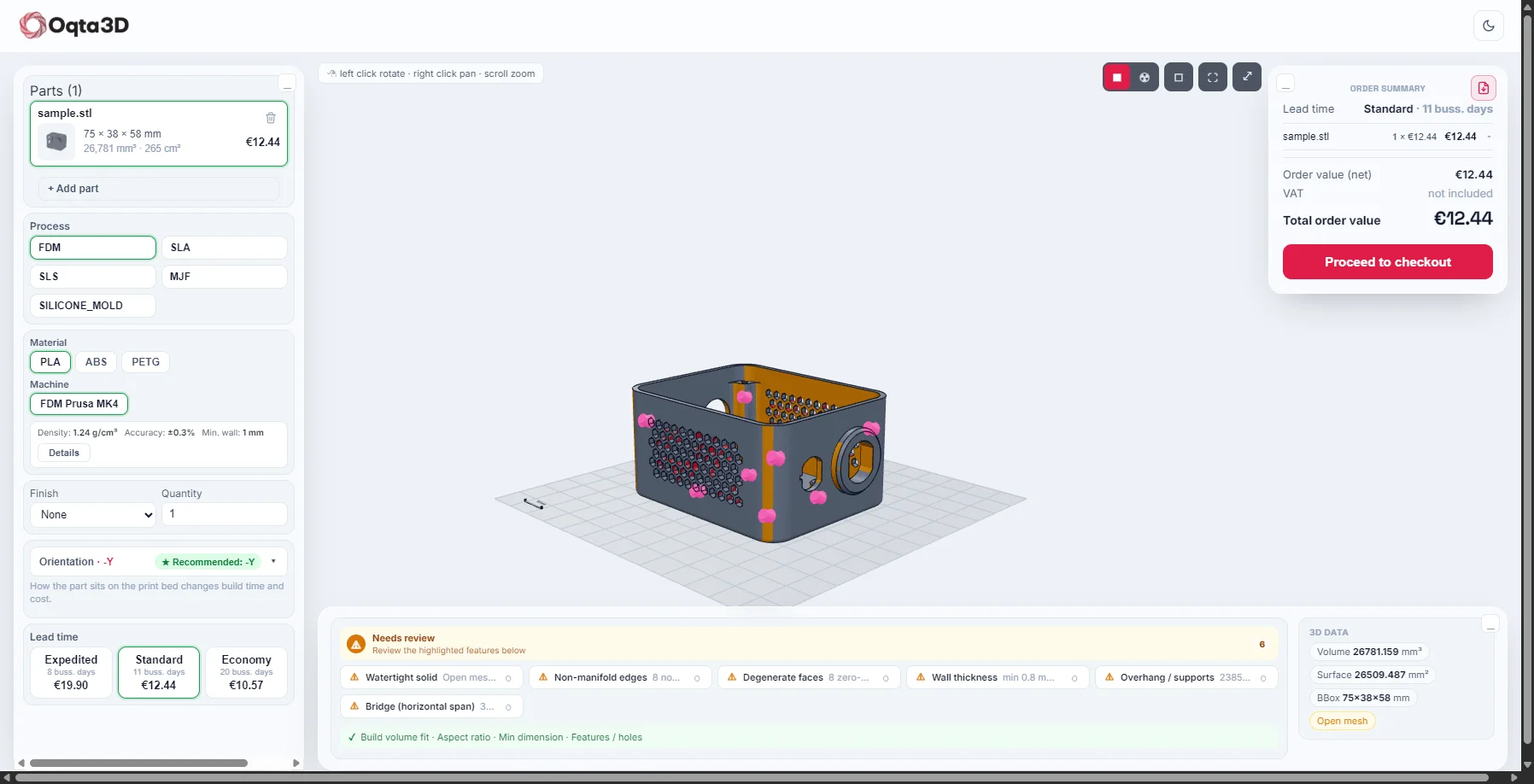
oqta3d.com/quote
Oqta3D instant quote workspace: config, 3D viewer and order summary
Upload a part and get an instant quote: configure, inspect and order in one view.
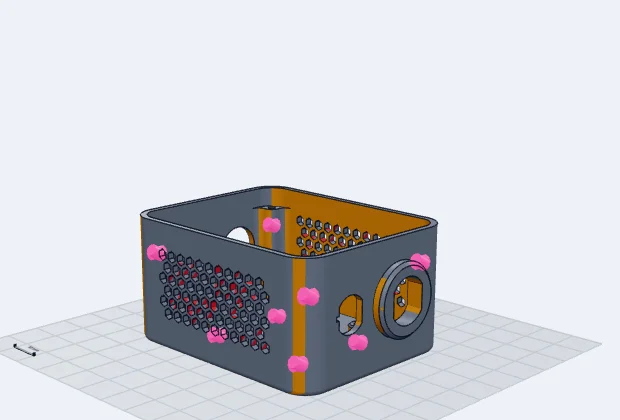
oqta3d.com/quote · DFM
DFM issues highlighted directly on the 3D model
DFM issues are highlighted directly on the model.

One workflow for customers, sales and production

Instant pricing is the start. Oqta3D keeps the request, commercial decision, customer approval and delivery connected.

Customer experience

A clear path from quote to delivery

Customer quote portal

Customers review quotes, approve the commercial offer and follow order and shipment status without another email thread.

One-click PDF quote

A branded, forward-ready PDF in one click. 3D thumbnail, cost breakdown and terms included.

Sales control

Review exceptions, not every quote

Commercial guardrails

Flag price deviations, low margin and risky DFM results for review before a quote reaches the customer.

Pricing logic you control

Set materials, machines, labour, waste, quantity discounts and geometry-driven expert surcharges without hiding the calculation.

Operations

Keep every handoff visible

Action-based work queues

Requests, quotes and orders are grouped by what needs attention, what is waiting and what is complete.

Email to quote

Email in, quote out. Requests are picked up, logged to CRM and quoted without retyping.

Controlled AI and data

Choose what AI may inspect and whether processing stays local. Schedule CAD deletion and review the staff access trail.

Microsoft Dynamics 365

Keep customers, contacts, opportunities, quotes and orders aligned through a monitored synchronization queue.

Your website. Your commercial rules.

Instant pricing and a customer portal, presented as one branded experience

Bring CAD upload, DFM feedback, quoting, approval and order tracking into your own customer journey. Oqta3D applies your catalog and pricing configuration while your team controls exceptions and commercial risk.

Embedded quote flowKeep visitors on your site from upload to quote.
Customer portalApproval, order and shipment status in one place.
Branded documentsCustomer-ready PDF quotes with your commercial terms.
Your pricing logicMaterials, machines, labour, waste and margin rules stay yours.
yourfactory.com / instant-quote
Drop your CAD file here
to get a price
Standard production€84.60

Order progress

Quote approved
Production started
Shipment recorded
The Oqta3D difference

Not just a quote calculator. A controlled path to the order.

Generic forms collect a request. Standalone calculators return a number. Oqta3D connects manufacturability, pricing, commercial approval and fulfillment in one traceable workflow.

CapabilityContact form / emailStandalone calculatorOqta3D
CAD geometry and DFM analysis-Partial
Your configurable cost and margin logic-Varies
Commercial review and price deviation controlManual-
Customer approval and order tracking--
Quote history, revisions and access trailScatteredVaries
Embeddable experience and REST API-Varies

From printed polymers to cast parts

Pick the process that fits the part. The price updates instantly for each.

Additive manufacturing

Four processes for prototypes and production parts.

4 processes
FDM

Fast and affordable

Form-fit prototyping on a budget.

Min wall 1.0 mm · supports required
SLA

Smooth and detailed

Fine features and smooth surfaces.

Min wall 0.5 mm · high resolution
SLS

Durable nylon

Functional parts with no support structures.

Min wall 0.7 mm · self-supporting
MJF

Production-grade

Nylon parts at production speed.

Min wall 0.7 mm · self-supporting

Cast parts

Moulded options for rigid and flexible small series.

2 processes
PU

Cast polyurethane

Rigid or rubber-like moulded parts for functional prototypes.

Shore 80D · moulded
SI

Cast silicone

Flexible, soft-touch parts for sealing and small series.

Shore 40A · moulded

Manufacturability checks, built into every quote

Spot geometry risks before quoting. Oqta3D maps each finding onto the model and presents the checks in one review.

Visual issue map 8 automated checks
DFM issues highlighted on the 3D model
Problem regions are highlighted directly on the model so the affected faces and edges are clear before quoting.

Manufacturability checks

Passes and risks are presented in one consistent review.

Build volume fit
Part fits the selected machine.
!
Wall thickness
Thin walls flagged per process minimum.
!
Overhang and supports
Faces beyond the support angle are marked.
!
Watertight / open edges
Open meshes that need repair are reported.
!
Non-manifold edges
Bad topology that may not print is flagged.
!
Bridge (horizontal span)
Long horizontal spans that need support are flagged.
!
Aspect ratio & min size
Very thin or tall-and-narrow regions are flagged.
Smart print orientation
Best build direction suggested, risky orientations flagged.

From manual handoffs to a controlled quote flow

The difference is not a stopwatch. It is whether every input, decision and approval stays connected.

1–2 days Waiting for emails, calculations and follow-ups
A clear price and lead time while intent is high Seconds
Manual workflow

Disconnected handoffs

1–2 days
  1. File arrives by emailThe request, notes and attachments begin in an inbox.
  2. Data is entered againGeometry findings and pricing inputs are copied between tools.
  3. Approval is chased manuallyThe latest decision and customer response are difficult to trace.
Fragmented and difficult to track
Oqta3D workflow

One connected quote record

Seconds
  1. File and request stay togetherCAD, customer context and quantities enter one structured record.
  2. DFM and pricing rules runGeometry risks, costs and commercial exceptions are presented together.
  3. Approval remains visibleThe team and customer follow the current quote through to the order.
Traceable and manageable

API-first, embeddable

Use the embeddable quote experience in your storefront or connect a custom customer journey through the REST API.

# Quote a part
POST /api/quote
{
  "part_id": "62",
  "material_id": "1",
  "machine_id": "2",
  "qty": 1,
  "lead_time": "standard"
}

Plugs into the tools you already use

Oqta3D connects CAD intake, customer quoting and your commercial workflow without forcing the team to re-enter the same information.

Works with every major CAD tool

Your customers export STEP, IGES, STL, OBJ, 3MF, PLY, GLB or DAE from SolidWorks, Fusion 360, Onshape, Inventor, CATIA or FreeCAD. Oqta3D reads them all.

Embeddable quote experience

Place the customer quote flow inside your own site and keep your catalog, pricing and buying experience together.

REST API

Connect file intake, quotes, DFM results and orders to a custom storefront or internal workflow.

Microsoft Dynamics 365

Synchronize customer, contact, opportunity, quote and order records through a monitored retry queue.

SolidWorks Fusion 360 Onshape Inventor CATIA FreeCAD REST API Dynamics 365

Security and access controls built in, not bolted on

Every file, every AI decision and every quote leaves a trail your team can review.

Two-step verification

Staff sign-in requires a second factor, not just a password.

Scheduled CAD deletion

Set a retention window; original CAD files are purged automatically once it passes.

Full staff access trail

Every view, download and edit of a customer's files is logged and reviewable.

Per-file AI consent

Customers and your tenant policy jointly decide what AI may see, and whether it stays local, file by file.

Frequently asked questions

3D printing services, on-demand manufacturers and design teams that want to give customers an instant price instead of an email thread.

STL, STEP, IGES, OBJ, 3MF, PLY, GLB and DAE. STEP and IGES give the most accurate geometry, DFM and pricing.

Analysis starts when the file is uploaded. Processing time depends on file format, size and geometry complexity.

Build volume fit, wall thickness, overhang and supports, watertightness and non-manifold edges, each flagged on the model before ordering.

Yes. The quote experience uses your catalog and pricing configuration and can be embedded in your customer journey.

Use the embeddable quote experience or connect through the REST API. Setup depends on your catalog, pricing rules and integration scope.

Oqta3D supports scheduled CAD-file deletion, role-based access, two-step verification and an access trail. AI use can be restricted by tenant policy and customer choice.

See it on your own parts

Tell us about your workflow and we will quote one of your real parts live, walk through the DFM analysis, and help you embed Oqta3D into your storefront.

  • Live demo on your own CAD file
  • Widget and API setup guidance
  • No commitment, no credit card
Thanks. We will be in touch within one business day.